Pan & Tilt · Example
Whip Pan
Swing the camera rapidly to a new direction. Allow brief directional blur during the move, then settle into a clear composition.
A whip pan swings the view quickly across a scene, using directional blur to connect one composition to another. Plan the movement around a clear departure and a readable landing frame.
Sign in to generate
Movement example — choose a move to explore the shot.
Watch fast horizontal turns in different scenes. Compare the direction, the brief motion blur, and where each pan settles.
Swing the camera rapidly to a new direction. Allow brief directional blur during the move, then settle into a clear composition.
A rapid horizontal turn shifts attention across a kitchen. Watch the brief blur and the landing composition.
Fast pans follow action around a tennis court, showing how motion blur connects two clear views.
Give a whip pan a clear direction and a readable destination. Use these motion references to plan the sweep, the brief blur, and the final reveal.
Speed and direction are the signature. The camera turns so quickly that scene detail briefly becomes horizontal streaks, then resolves into a new composition. The landing matters as much as the blur: without it, the movement can feel accidental.
Open Workspace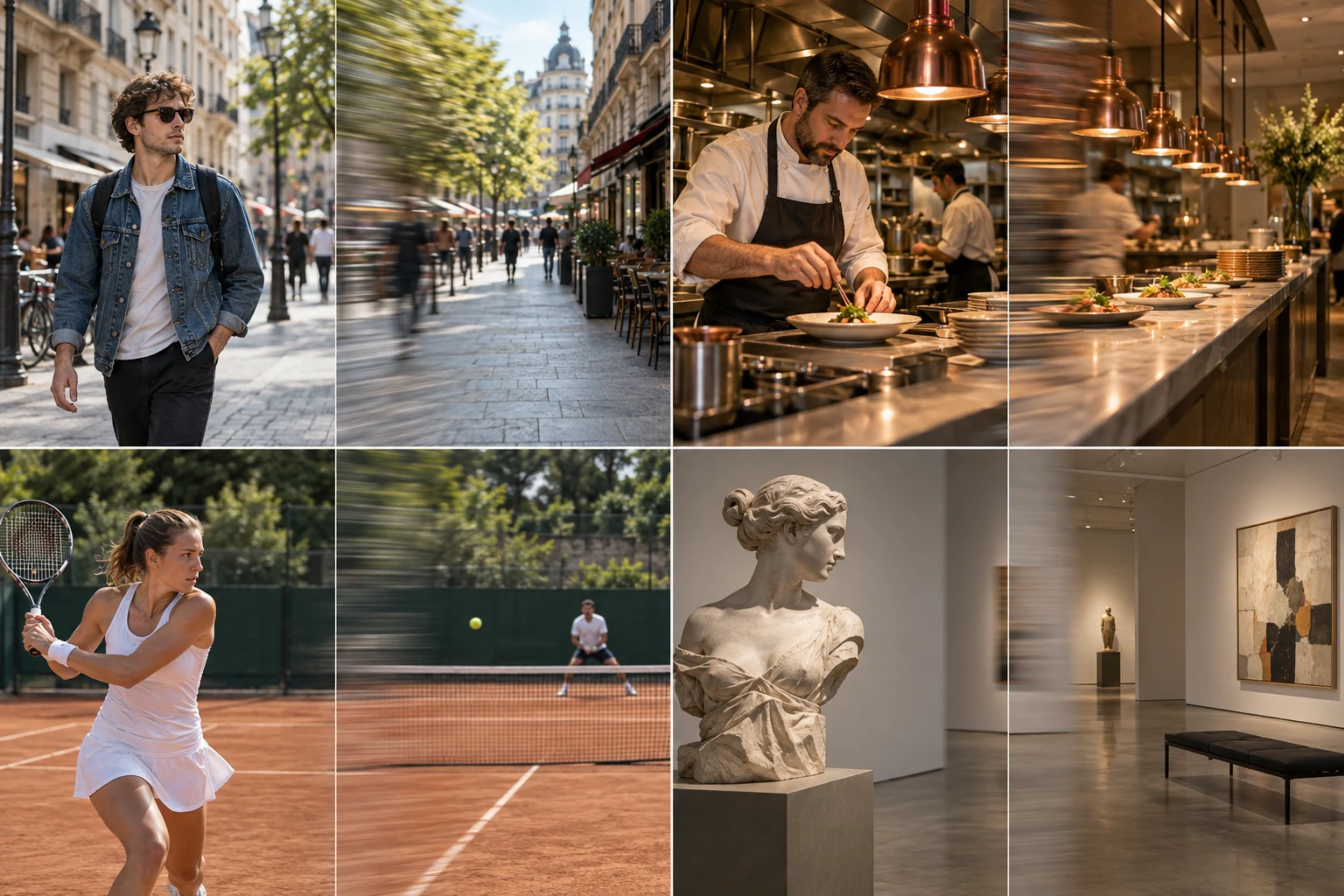
Whip pans can punctuate a reveal, follow sudden action, or hide a cut between two shots. This movement is also sometimes called a swish pan. Give the viewer a short readable moment before and after the sweep so the transition has a purpose.
Open WorkspaceWrite "pan rapidly right, then settle on the doorway" rather than stacking pan, orbit, and zoom in one instruction. Match the direction across adjacent clips if you plan to join them in an editor. A shared direction helps the cut feel intentional.
Open WorkspaceA fast sweep hides product text and small visual details. Use a controlled truck or slow pan for architecture, labels, or scenes the viewer needs time to inspect. Reserve the whip for rhythm and surprise.
Open WorkspaceAI-generated framing illustration.
Match the direction of two whip pans when joining clips in an editor. Keep the fast blurred interval short enough to hide the cut.
Sweep from the opening subject toward a clear destination. Let the camera settle so viewers can understand what has been revealed.
Use one fast pan to punctuate a beat. Alternate it with stable framing so the sequence remains easy to follow.
Start with a clear camera direction. Copy the full prompt and adapt it to your image.
Pan rapidly to the right with a brief sweep of directional blur. Keep the horizon level, then settle into a sharp, readable landing frame.
Begin with a stable eye-level view of the subject on the left side of the scene. Hold briefly, then whip pan rapidly to the right in one continuous horizontal turn. Allow short directional motion blur during the fastest part of the sweep. Decelerate as the camera reaches the destination on the right, then settle into a sharp, stable composition. Keep the horizon level and the scene lighting consistent. Avoid a zoom, orbit, repeated back-and-forth pans, or blur that continues after the camera stops.
Choose left or right and use the same direction if you intend to connect another clip.
Blur belongs to the fast sweep; the opening and landing should remain readable.
Name a destination visible in your source and ask the camera to settle there.
Compare dolly in and dolly out with video references, practical framing advice, and editable camera prompts for forward and backward movement.
Frame a face zoom from one photo. Explore close-up timing, customize a camera prompt, and prepare a punchy portrait reveal with adjustable motion controls.
Explore drone shot AI with flyover, reveal, elevated orbit, and FPV dive references. Customize the aerial path and camera prompt from a single scene image.
Choose a source image, refine the direction, and set the pace in the workspace.
Open WorkspaceNo. A pan turns the viewing direction from a camera position; a truck translates the camera sideways. A whip pan emphasizes a fast turn and brief directional blur.
Yes as an editing concept. Plan matching sweep directions and cut during the blurred part. The workspace takes one source image, so a precise two-clip transition still needs editing and review.
Name the direction, speed, ending subject, and settling behavior. Avoid asking for many unrelated camera actions in the same short shot.
Keep it brief and directional. If the entire shot stays blurred, ask for a sharper starting frame and a clear hold after the movement.